Future Teachers: 5 reasons ArcGIS should be in your toolkit right now
Imagine teaching and learning tools that support social studies, geography, history, science, math, and Indigenous education while also building the skills students need now and in the future. This set of tools exist, and many preservice teachers haven’t even heard of it!
It’s ArcGIS, a geographic information system (GIS) platform that provides users the ability to create maps, conduct data analysis, tell a story in an interactive format, collect data and much more. ArcGIS is used by professionals across sectors in government, private organizations, and nonprofits around the world. Whether you're mapping climate data, building a digital story, or exploring historic treaties in Canada, ArcGIS turns curriculum into engaging learning opportunities. Here are five reasons it deserves a place in your teaching toolkit.
1. It builds the competencies that students require to navigate our complex world
In Canada, six global competencies are identified across provinces and territories in K-12 education. ArcGIS supports these competencies, also referred to as transferable skills in some provinces. Here are some of the ways it does that:
- Analyzing data on a web map builds critical thinking and problem solving
Students use ArcGIS Online to explore and analyse maps, interpreting patterns,
relationships, and trends in the data to make informed decisions and gain insight. - Storytelling develops multimodal communication
Students use ArcGIS StoryMaps to combine maps, text, visuals, media and data to
communicate content in a clear and compelling way. - Collaborative mapping strengthens teamwork
Students use ArcGIS Survey123 to collect data collaboratively on an issue or challenge in their community and come up with solutions. - Developing creativity and innovation
Students tackle a real community challenge such as mapping food deserts and then design a creative solution like a student-run mobile market or school garden program that demonstrates innovative and entrepreneurial thinking. - Self-directed learning
Students use ArcGIS to make decisions about their own learning, such as choosing data, organizing layers, and revising their maps. This helps them practice planning, self-monitoring, and reflecting on how their choices shape the results they want to see. - Investigating issues like climate change, land use, or heat islands deepens insights into global citizenship and sustainability
Students consider the impacts of human decisions on communities and ecosystems, helping them understand their role in shaping a more sustainable future.
As global competencies become embedded across provincial curricula, ArcGIS helps you meet learning expectations while building the knowledge and essential skills students need to become adaptable and thoughtful decision makers in our society.
Inspiration:
Read about Sarah Gallah, a preservice instructor and high school teacher who uses ArcGIS StoryMaps to bring geography and science to life!
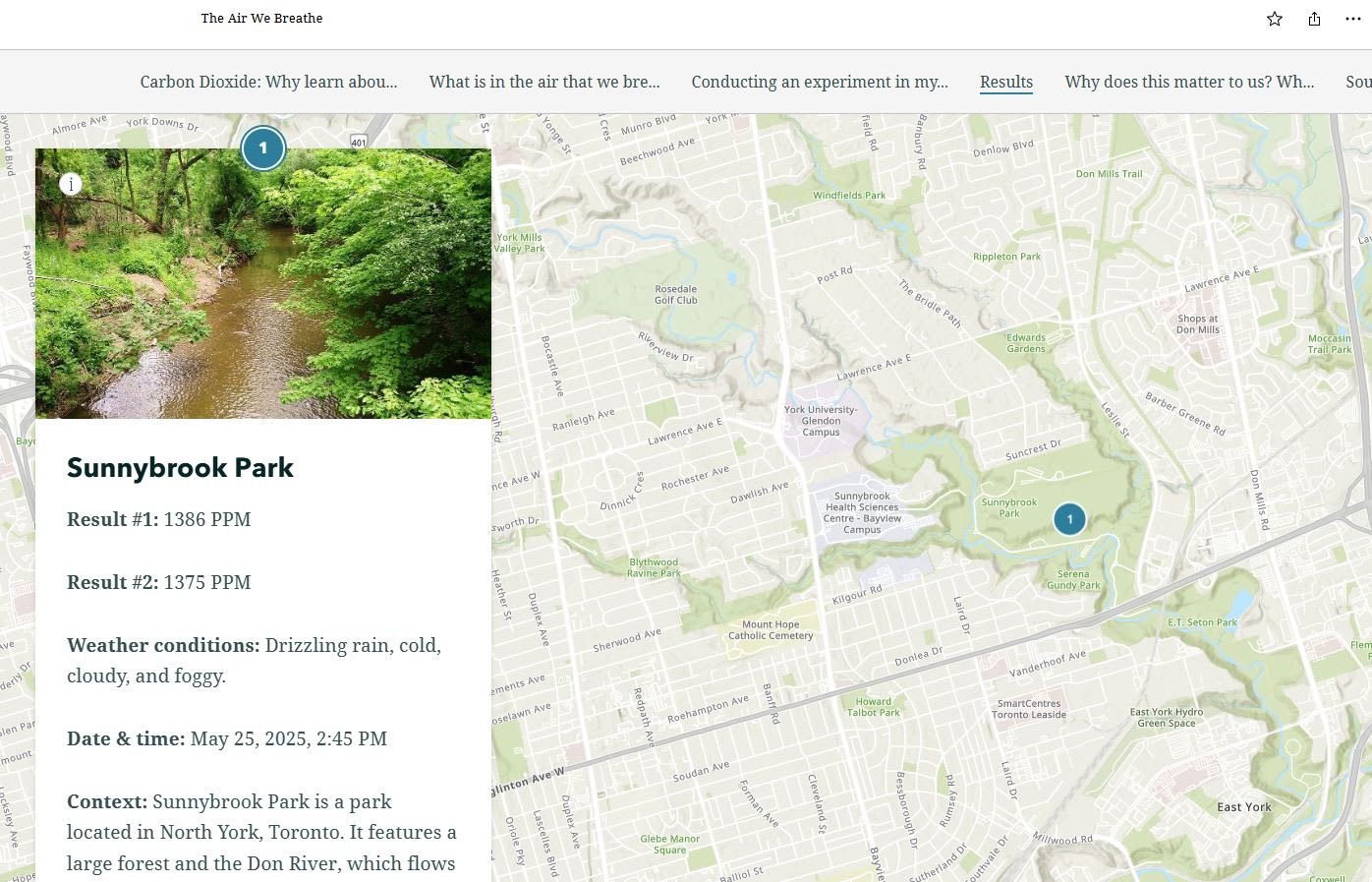
A student storymap called "The Air We Breathe" shows the results of carbon dioxide collection in Toronto. The work required to create this included many of the global competencies, such as self-directed learning, creativity and innovation, and communication.
2. It makes inquiry actionable and builds spatial literacy
GIS use is tied to inquiry-based learning in the curriculum because it enables students to gather, analyze, and interpret data as part of the inquiry process. ArcGIS puts inquiry into motion by giving students access to spatial data and analysis tools, allowing them to investigate meaningful questions and puts them in a decision-making role.
With ArcGIS, students work with authoritative data on climate, demographics, ecosystems, land use, and transportation. Instead of relying on hypothetical scenarios, they explore issues that matter to them: How is our community changing? What environmental patterns shape our neighbourhood? How do human decisions influence natural systems?
This approach also builds spatial literacy. Students deepen their ability to understand how places, patterns, and relationships shape the world, an expectation reflected across Canadian curricula in geography, science, social studies, and beyond. ArcGIS becomes the bridge between curriculum goals and student-directed exploration.
Inspiration:
Learn how Brian Beard, a high school geography teacher, turns lessons into real-world explorations and inquiries.
3. It supports cross-curricular teaching and learning
Students experience the world as an interconnected whole, and their learning should reflect those connections. ArcGIS offers a set of tools that help students make meaningful links across different areas of the curriculum.
Examples include:
- History and geography: Map a soldier’s life, analyse the terrain elevation of Vimy Ridge
- Science and geography: Monitor the environment in your community, map biodiversity, analyse climate investigations, explore heat and cool islands in Canada
- Mathematics and environmental education: Measure green space in a school area, collect data such as temperature or rainfall and calculate averages
- Language arts and geography: Digital storytelling with StoryMaps, integrate maps with points and routes of important places
Inspiration:
Discover how Chris Cocek, a Halifax educator used ArcGIS for a cross-curricular citizen science project for P-12 classes.
4. Support for Indigenous and Land-Based Education
Education in Canada has been undergoing an important shift toward reconciliation and the inclusion of Indigenous perspectives. ArcGIS can support this work as you explore traditional territories, Indigenous place names, local cultural landscapes, land stewardship practices, and environmental changes affecting Indigenous communities. These explorations help students understand that land is not just a physical space but a source of identity, meaning and connection.
Used in partnership with local Indigenous communities, ArcGIS can be a powerful tool for reconciliation-focused teaching and land-based learning.
Inspiration:
Understanding and strengthening Indigenous communities using GIS
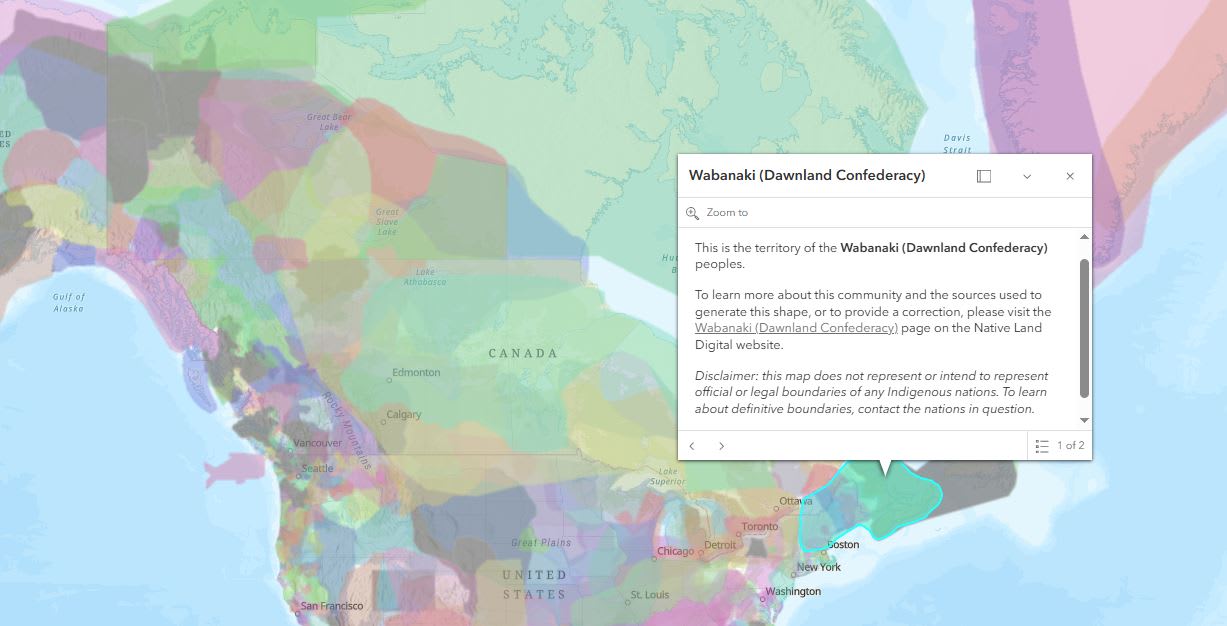
ArcCanada Atlas – Indigenous World map.
5. It's free for every K-12 school in Canada and ready to use resources are available
Cost is often the biggest barrier to adopting new technology. Through the Esri Canada K-12 program, ArcGIS is free for preservice teachers and instructors, and K-12 teachers and students. They can request access to ArcGIS which includes ArcGIS Online, ArcGIS StoryMaps, ArcGIS Survey123, other ArcGIS apps and a collection of ready-to-useArcGIS resources in English and French.
Additional benefits
Support differentiated learning
ArcGIS supports differentiated learning by giving students multiple ways to engage with content. Learners can explore ready-made maps, analyze data layers, or create their own maps and storymaps, allowing tasks to be easily scaled for different abilities. Because ArcGIS is visual and interactive, it works well for diverse learning styles and helps every student participate at a level that feels achievable.
The Urban Trees: Battling Heat, Climate Change and Crime lesson is a great example of this. Students can complete all three inquiries in the lesson or do only one if they choose. Each inquiry builds on the analysis that can be done in ArcGIS Online.
ArcCanada Atlas is another example. Beginners can use the ready-made activities offered, while the intermediate and advanced users can use this resource as an example of what they can create themselves – an ArcGIS Atlas Instant app.
Access to ArcGIS workshops at no cost
Preservice teachers have access to free ArcGIS workshops designed for K-12 education. If you’re interested, share this opportunity with your course instructor. Preservice instructors can request a workshop by contacting k12@esri.ca.
Technical and Resource Support
Once you are using ArcGIS, you may have questions about what resources are available for a specific course or perhaps you may have a technical question – contact us for help at k12@esri.ca.
Before you graduate – create a spatial resume
Leave a lasting impression on your future teaching applications by creating a resume that truly sets you apart from others. Build a storymap that brings your educational, volunteer, and professional experiences to life through interactive maps, narrative text, and engaging visuals. It’s a powerful way to highlight the skills that you have, what you have done, so far, and the impact you have made.
The time is now to start using ArcGIS
There’s no better moment to begin your ArcGIS journey. Explore our Preservice Hub to learn more and start building the skills that will shape your future classroom.
Happy Mapping!